Posty

Więcej niż 3 kategorie w Storefront

Obraz
Temat nie jest bezpośrednio związany z Linuxem ale... Szablon Woocommerce dla Wordpressa o nazwie Storefront wyświetla domyślnie tylko 3 kategorie. Aby to zmienić w pliku functions.php (najlepiej w szablonie child ) dodajemy: Thats not recommended way.. storefront provide filter to modify the code.. Here is solution copy and paste the code in your functions.php add_filter ( 'storefront_product_categories_args' , 'storefront_product_categories_custom_args' );   function storefront_product_categories_custom_args ( $args ) { $custom_limit_count = 10 ; // change this number for needs $args [ 'limit' ] = $custom_limit_count ; return $args ; }
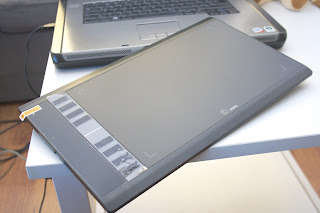
Tablet Ugee M708 na Linuxie

Obraz
Pobieramy stery i instalacja You can grab the latest code by going to the main page:  https://github.com/DIGImend/digimend-kernel-drivers From there you can just click the green "Clone or download" button and then "Download ZIP". Alternatively you can also use the git command to stay up to date: To install Git:  aptitude install git  or  apt-get install git To grab the latest code:  git clone https://github.com/DIGImend/digimend-kernel-drivers.git i dalej ze strony:  https://github.com/DIGImend/digimend-kernel-drivers W folderze ze ściągniętymi sterownikami: make sudo make install sudo rmmod hid-kye sudo rmmod hid-uclogic sudo rmmod hid-huion and reconnect the tablet. Or simply reboot the machine. UWAGA! Po każdym upgrade kernela należy powtórzyć instalację! Żródło: https://github.com/DIGImend/digimend-kernel-drivers/issues/48 https://github.com/DIGImend/digimend-kernel-drivers

Instalacja Nvidia drivers na KDE Neon

Obraz
You use the following command to get the list of packages for each driver, and then install the packages using apt-get. Code:  Select all sudo ubuntu-drivers devices Should get output something like this: Code:  Select all == /sys/devices/pci0000:00/0000:00:01.0/0000:01:00.0 == vendor   : NVIDIA Corporation modalias : pci:v000010DEd00000DDAsv000017AAsd000021D1bc03sc00i00 model    : GF106GLM [Quadro 2000M] driver   : xserver-xorg-video-nouveau - distro free builtin driver   : nvidia-304-updates - distro non-free driver   : nvidia-304 - distro non-free driver   : nvidia-331 - distro non-free recommended driver   : nvidia-331-updates - distro non-free Then install the driver for your card. Most likely the recommended one: Code:  Select all sudo apt-get install nvidia-331 Once done, run the command: Code:  Select all sudo nvidia-xconfig Reboot and you should be all set.

Chromium browser - język polski (brak)

Obraz
Aby posiadać spolszczoną wersję chromium-browser (jeśli interfejs jakimś sposobem jest po angielsku) instalujemy: sudo apt-get install chromium-browser-l10n

Podział flaka na kawałki :)

Obraz
Aby podzielić album muzyczny zgrany do jednego pliku .flac postępujemy zgodnie z wytycznymi: 1. Instalujemy sudo apt-get install cuetools shntool flac 2. Następnie dzielimy plik na kawałki poleceniem cuebreakpoints album.cue | shnsplit -o flac album.flac gdzie "album"  zstępujemy oczywiście czym trza :)

Brakujące przyciski i motywy w Kdenlive

Obraz
Jeśli brakuje przycisków i motywów w kdenlive, sprawę załatwi instalacja tych bibliotek: sudo apt-get install kde-runtime Po instalacji wszystko wraca do normy jak widać na obrazku poniżej :) p.s. WARTO! zainstalować dodatkowe wtyczki fre0ir, np przez menadżera aplikacji lub w terminalu: sudo apt install frei0r-plugins

Open as Root - menu w LXDE

Obraz
Brakującą pozycję w menu kontekstowym w LXDE można dodać: Create  ~/.local/share/file-manager/actions . In that folder, create  root.desktop  (not pcman_root.desktop or anything else). Add this content: [Desktop Entry] Type=Action Tooltip=Open Folder As Root Name=Open Folder As Root Profiles=profile-zero; Icon=gtk-dialog-authentication [X-Action-Profile profile-zero] MimeTypes=inode/directory; Exec=/usr/bin/gksu /usr/bin/pcmanfm %u Name=Default profile Save the file. (Or download the script from  here .) Restart PCManFM (System Tools, Task Manager, terminate or kill pcmanfm, then start it again). Now, when you right-click on a folder, you should see the "Open as root" option in the context menu. Źródło: http://askubuntu.com/questions/444305/add-open-folder-as-root-to-pcman-file-managers-context-menu